It handles the grind. You take the fight.
TopWar Helper is a desktop command console for TopWar: Battle Game — dailies, hunts and rally-joins queue and run themselves, while Battle Mode injects quick-attack buttons and global hotkeys. Official, international and channel servers. One licence, unlimited accounts.
Two modes
One console, two ways to play.
The two modes are mutually exclusive — even the window chrome follows the mode: cool black while it grinds, warm black when you fight. One glance tells you who's driving.
Robot Mode
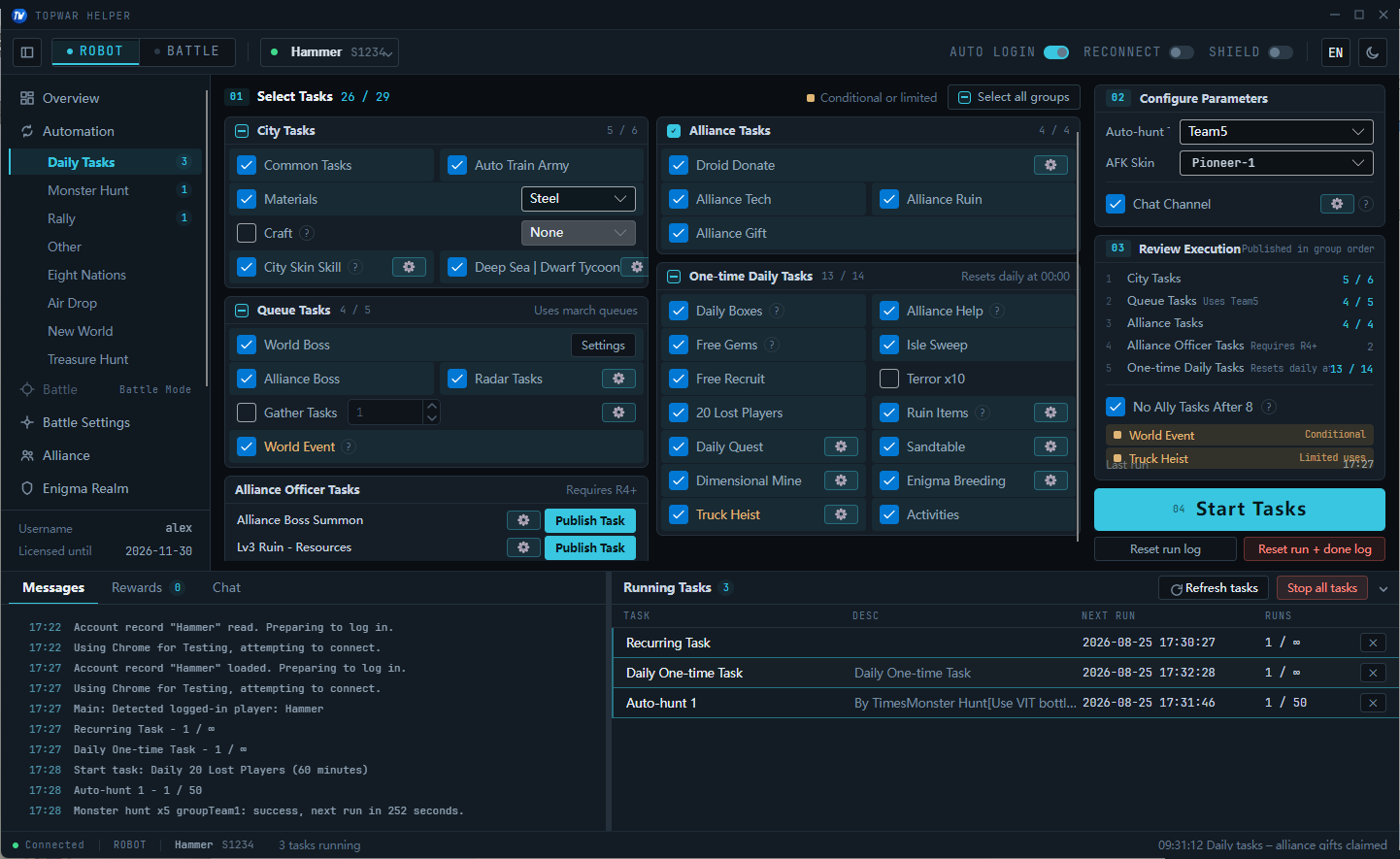
Runs dailies, monster hunts, rally-joins, Eight-Nations and alliance tasks on a scheduler. Queue it before bed — resources are banked by morning.
- Daily Tasks
- Monster Hunt
- Rally
- Eight Nations
- Air Drop
- New World
- Treasure Hunt
- Alliance
12 PAGES · SCHEDULED TASKS · AUTO-RECONNECT
Battle Mode
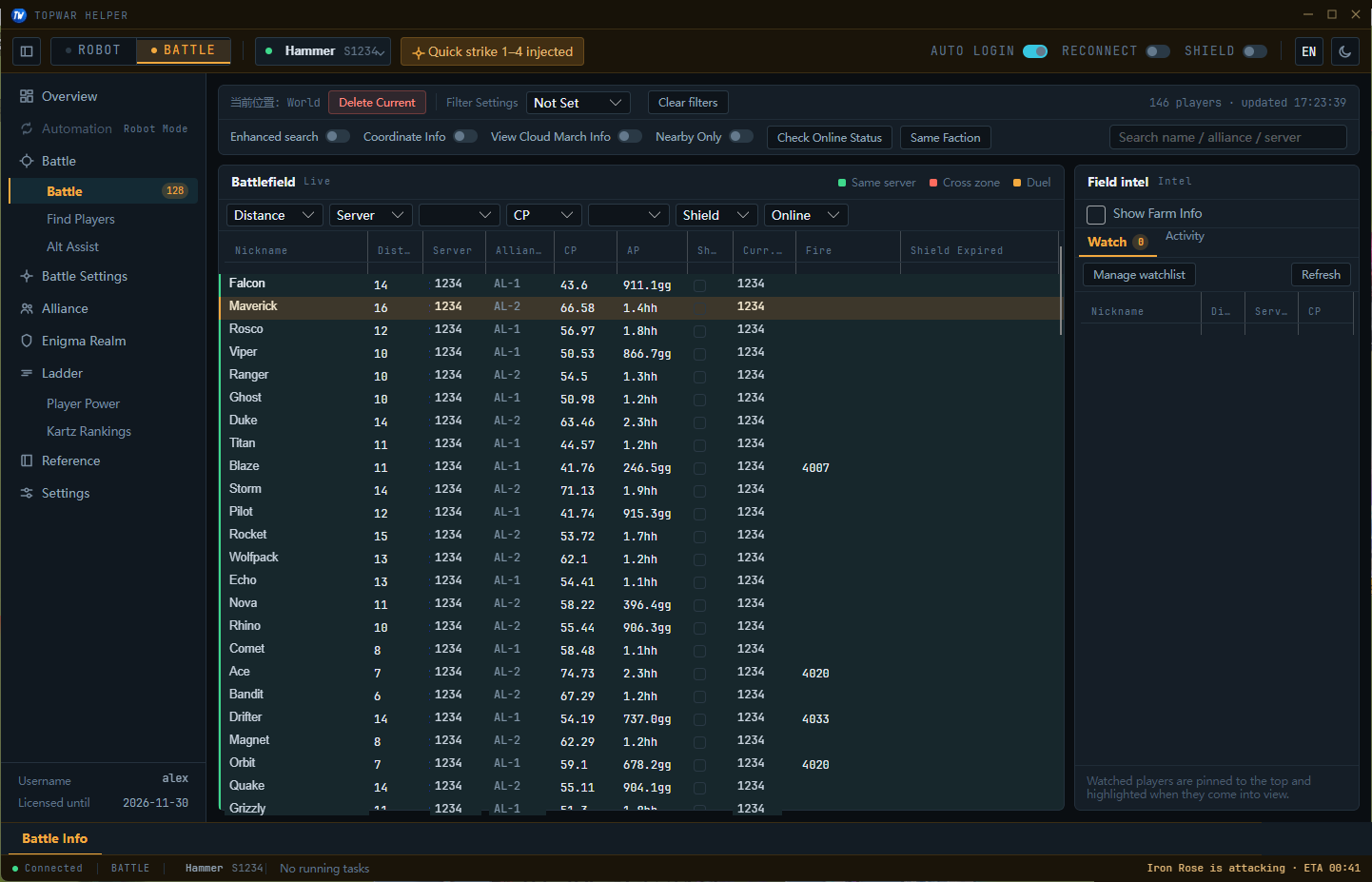
Live battlefield, player finder, battle presets and alt-account assist, with injected quick-attack buttons and hotkeys. Move-city alerts plus auto-shield — sleep through the sieges.
- Live Battlefield
- Find Players
- Quick Strike 1–4
- Alt Assist
- Move-city Alert
- Auto Shield
6 PAGES · INJECTION REQUIRED · GLOBAL HOTKEYS
Screenshots
This is the real UI.
Real screenshots — Daily Tasks and Battle, both laid out below; the Battle view carries an inset of the injected in-game buttons. (Player names and servers randomized.)
 20
20Pricing
One price. Everything unlocked.
No tiers, no editions. Try it for 24 hours, then decide.
TOPWAR HELPER · FULL ACCESS
EVERYTHING
$12/ 30 days
one-time payment · no auto-renew
- All 12 Robot Mode pages
- Battle Mode + quick-attack injection
- Unlimited accounts
- Official · Intl · Channel · Huawei
- Alt assist · move alerts · auto-shield
- Auto-updates · new features included
Expires on its own. No silent charges.
FREE TRIAL
24 hours free, then talk
- 01Download and install
- 02Register — no card needed
- 03Trial starts automatically, full access
Expires on its own. No silent charges.
FAQ
The honest answers.
Will I get banned?
Tasks fire on human-like rhythms with randomized delays, and high-risk features (like talent-scroll farming) simply aren't offered. Bans have been extremely rare over years of operation — but no third-party tool can promise zero risk. Judge for your own account.
Which servers and accounts work?
Official, international, channel, Alipay and Huawei accounts can all be added. One licence covers unlimited accounts — switch any time from the accounts page.
How does the trial work?
Install, register, and the 24-hour full-feature trial starts automatically — no card required. It expires on its own and never charges you.
How do I pay, and when does it activate?
Purchasing on the site is temporarily closed while we switch payment channels. Existing licences are unaffected and keep their expiry dates. This page will be updated as soon as it reopens.
Do I keep the game open while it grinds?
No. The helper runs the game in its own embedded browser in the background — your own client stays free. Minimize it and use your PC normally.
Is there a macOS version?
Yes. There is a Windows build (Windows 10 / 11, installer), a macOS build (macOS 12 or later, Apple silicon and Intel) and an Android build (APK; the account has to be created in the Windows app first). On macOS you install it by running the one-line command from the download section in Terminal, and the same command updates it later.
Changelog
Always shipping.
- v5.2.3CURRENT
New Bees mode spreads full-map player searches across a few alt accounts, replacing the old clone logins; Loot Quest fully rewritten; now natively compiled for a smaller installer and faster start; a frozen game view is detected and reloaded automatically.
- v5.1.7
Fixed Chip Blessing and, in the same place, the Sheep and Christmas parades — the checkbox had no effect and raised no error; the setting is now saved per account.
- v5.1.6
Licence tokens can now be carried between devices; added an explicit sign-out; browser connection failures are now reported by category instead of one generic error.
The trial is free. Decide after.
Install it, get 24 hours of everything. Queue tonight, check your depot in the morning, then decide if it's worth $12.
ANDROID
Download for AndroidAPKV5.2.2 · ~15 MB · ANDROID 8.0+ · 64-BIT DEVICES
Create your account in the Windows app first; the Android app is sign-in only.
Not available for iPhone or iPad.

MACOS
curl -fsSL https://q.ndexpress.cn/desktop/osx/install.sh | bash~30 MB · APPLE SILICON & INTEL
- Press Command + Space, type “Terminal” and open it.
- Paste the command above and press Return. It downloads, installs and opens the app.
To update, run the same command again. Your settings and accounts are kept. No sudo needed.
macOS 12+